Lenny Kioko
TradingPanel EA
Advanced Trade Panel for MT5
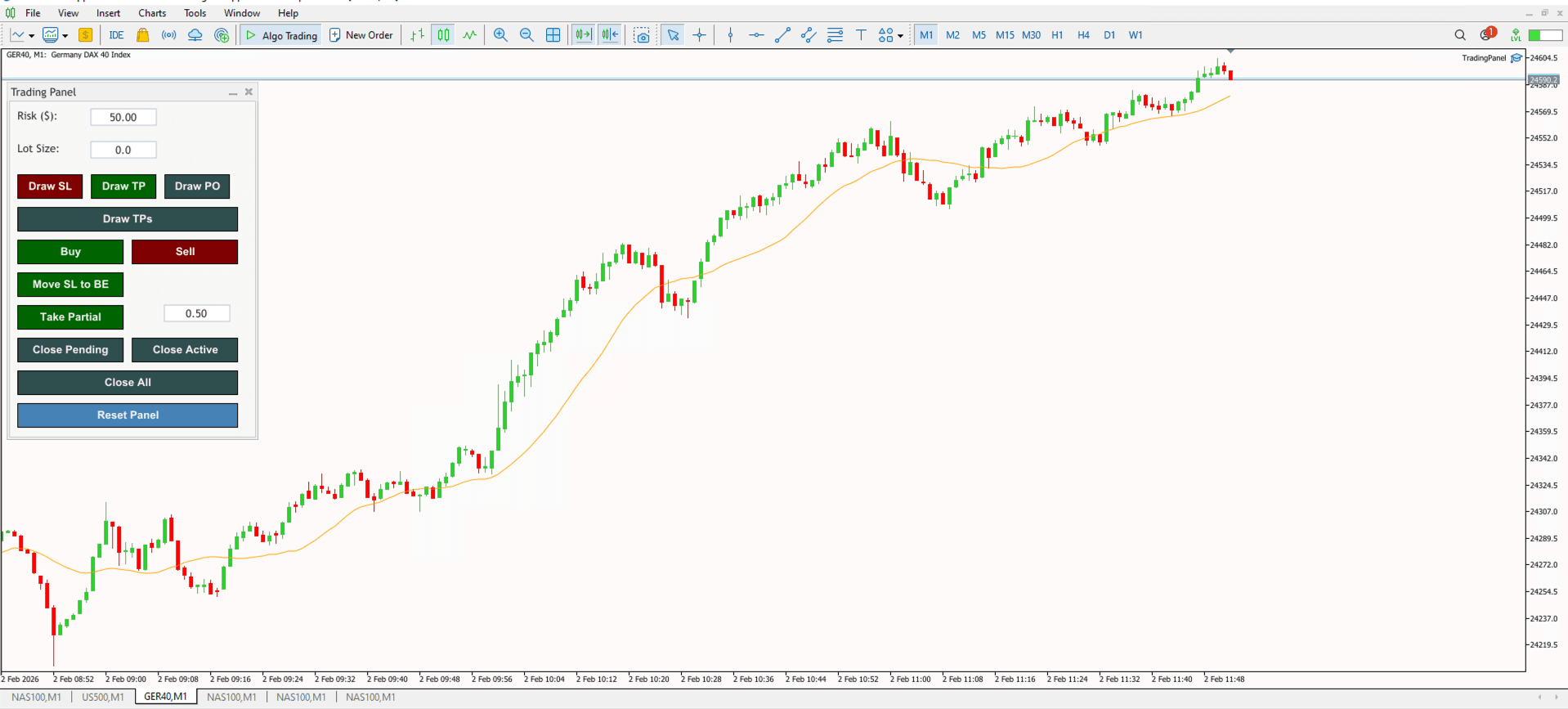
The TradingPanel EA is a comprehensive dashboard designed to streamline trade execution and professional risk management on MetaTrader 5. It replaces manual calculations with a visual, interactive interface that handles everything from lot sizing to complex trade management tasks like partial closes and break-even moves.
Key Features
- Visual Trade Planning: Drag and drop lines on the chart to set Stop Loss, Take Profit, and Pending Order levels visually before executing.
- Auto-Risk Calculation: Automatically calculates the precise lot size based on your pre-set dollar risk ($) and Stop Loss distance.
- Smart Order Execution: Detects whether to place a Market, Limit, or Stop order based on your line placements relative to current price.
- Advanced Trade Management: Includes one-click buttons to move Stop Loss to Break Even or take Partial Profits (customizable %).
- Reward:Risk Projections: Instantly project multiple Take Profit targets (TP1, TP2, TP3) on the chart based on your Risk:Reward ratios.
- Bulk Position Control: Dedicated buttons to Close All, Close Pending, or Close Active positions instantly.
Installation Guide
Download the EA file and place it in your MetaTrader 5 'Experts' folder. Restart your terminal, and you will find the TradingPanel EA in the Navigator window under Expert Advisors. Drag and drop it onto your chart to get started. Ensure 'Algo Trading' is enabled in the toolbar.